Why are These Vulnerabilities So Prevalent? A01 Broken Access Control
Intro
In my last blog post, I walked through a blind out-of-band SQL Injection vulnerability I discovered during a web application pentest and the complexities / difficulties I faced during that engagement. This blog post will be a little different. Instead of an engagement story, we’re going to look at Broken Access Control, the category that sits at #1 on the OWASP Top 10 and one of the most commonly found issues in web apps.
IDOR is one type of Broken Access Control, and it’s the one that gets the most attention, mostly because it’s common and usually the easiest to demonstrate. But the underlying problem is the same across all of them, the application doesn’t check whether the user is actually allowed to do what they’re asking.
I am by no means an expert on this topic but I have found several serious BAC issues on real engagements this year, infact it is one of my most common findings in webapp pentests, particularly in bigger applications, and that has prompted me to do deeper research into why these vulnerabilities occur in the first place alongside the more difficult to find issues. We’ll start with why Broken Access Control is so common in the first place, then go and exploit abit of a trickier IDOR case.
Why is it still A01?
According to the OWASP top 10 2025 100% of the applications tested had some form of broken access control, with 40 CWEs falling under this category, keeping it at the #1 spot. The numbers are surprising, over 1.8 million total occurrences, 32,654 associated CVEs, and an average weighted exploit score of 7.04. In 2021 broken access control also sat at #1 on the list with over 318,000 instances and 94% of applications being tested for some form of it. The API top 10 similarly lists three of its top five as access control vulnerabilities, BOLA, BOPLA, and BFLA.
So, why exactly is Broken Access Control so common? It makes sense once you understand why building a secure access control system is hard to get right. Unlike vulnerabilities like SQL injection and XSS which have consistent and repeatable mitigations (use parameterised queries, use output encoding, etc.), access control doesn’t have an equivalent universal fix because it is fundamentally a logic problem. The authorisation check for viewing a user’s profile settings is different than the check for editing a user’s document, which is different from accessing paid custom functionality, or deleting the user account altogether, and so on.
To illustrate, consider a healthcare application. A patient logs in to view their records and their browser sends GET /patients/5/records. The backend now has to confirm two separate but easily confused things: that the request is authenticated, and (the part that is easy to forget) that this session is actually allowed to read record 5, whether because the user is patient 5 or because they have a legitimate reason to be there, such as being the doctor or a sysadmin. It seems that the first check is what everyone remembers, and the second one gets forgotten. Further, if the patient can see their own ID in the request, what stops them from changing 5 to 6? If the backend only checks that the request is authenticated and never checks whose record is being asked for, then GET /patients/6/records will just hand over the 6’s medical history, diagnoses, prescriptions, and anything else in their “records”. Because the IDs are sequential, patient 5 could also then just script a loop from 1 to N and walk the entire patient database, extracting all patient records.
The above is a simple example with one simple endpoint. Modern applications are unfortunately not as simple, they’re not built like they used to be, a system with 50 microservices can have over 500 API endpoints with single requests potentially triggering 10-20 internal API calls across different services. Each of those services needs to decide whether the user is actually allowed to do what they’re asking, and the problem is that in a lot of modern architectures, service A checks the user’s token and then calls service B internally, and service B trusts it because it came from inside the network. Service B then calls service C to pull the actual data, and service C trusts the request because it came from service B. Introduce D and E and things start getting very complicated. Ultimately if that first check on service A is wrong or missing then everything downstream of that may be vulnerable.
Vulnerability scanners?
You might be wondering if Broken Access Control is so common, why don’t vulnerability scanners find it? Most automated detection in scanners is built to detect the presence of something dangerous, it injects various malicious payloads into the application and monitors the response for something that shouldn’t happen, such as a database error, a reflected <script> tag, or time delays that correlate with the injected payload. A 200 ok response displaying another users sensitive patient data is not an error or anomaly, from a scanners perspective nothing looks out of place the application has simply returned a valid response.
The fact that automated tooling struggles here is why the burden mainly falls on the people writing and reviewing the code. To get a sense of that side of it, I asked a few developers why they think these vulnerabilities are so common. A common answer I received was that access control mostly comes down to human discipline. One software engineer put it like this:
Access control necessarily involves some cognitive overhead and engineering responsibility. Not all business rules can/should be captured as middleware. If they are, you need to remember to add it correctly. If it is not, like in the case of “can authenticated user x mess with y”, this will be captured at the handler level. Without discipline and a good code review system it’s easy for these things to slip through the cracks. No linter or CI/CD pipeline can catch semantic mistakes like this for you. - Maximilian, Software Engineer
So, similarly to the vulnerability scanner problem, a linter won’t catch it for the same reason Burp Suite or Nuclei won’t, because there’s nothing actually wrong with the code, it runs fine and returns a valid response, except really it is disclosing very sensitive patient data to an unauthorised user.
The responses I received align with day-to-day pentesting as well, as I mentioned earlier in this post, on nearly every webapp engagement I’ve done this year I’ve found some form of BAC. I’m not the only one either, several of my colleagues have found some very serious issues while on webapp tests, everything from textbook IDOR to full privilege escalation to admin and account take overs. I felt it was worth writing about for this reason, these vulnerabilities aren’t edge cases they are very common and often have a high impact.
What about AI?
A big question in 2026 is whether any of this still holds now that models can read code and “reason” about it. If a scanner fails because it only looks for the patterns mentioned earlier, surely a model that can reason about a request can tell when a user is trying to access data that isn’t theirs. There is a growing market of agentic pentest tools, some of which attempt to do what a pentester would do when testing for BAC issues, they are given several accounts across different roles and then similar to the Burpsuite Autorize plugin, repeat the same requests, compare the responses, and flag where a low-privilege account gets something back that only a higher-privileged one should.
It only takes you as far as the tool can see though. Take a banking app for example that lets staff move money in two steps, one person raises a payment and the second person approves it before it leaves. The business rule is that the two can’t be the same person. If the approval endpoint checks that the caller has the approver role but never checks that the approver isn’t the same account that raised the payment, then anyone with an approver account can raise a payment and also approve it, sending money out on their own. AI using an Autorize-style diff would miss it because every approver can approve payments, so comparing two approver accounts shows the same allowed behaviour for both, and comparing the payment raiser against the approver only confirms that the raiser can’t approve, which is the check working as intended. What makes it fraud is that the same account did both, and a rule in the bank’s policy says it can’t.
The rule isn’t in the traffic or the code so a model reading the requests has no more to go on than the tool does. A model reading the code has the same issue, it can only flag the missing “approver cannot be the raiser” check if it already knows that rule exists and a human would have to tell it that.
Right, lets get into the fun stuff.
Broken Access Control - hackxpert lab
Before I get into it I want to give a quick shout out to Wesley Thijs, aka The XSS Rat, who built the hackxpert labs I’m using for this part. He kindly gave me access to the private repo behind the labs so I could go through the actual source code and write about it. If you don’t already follow him, he’s a hacker who’s spent years teaching web app security through his labs, courses and bug bounty streams.
The lab is filed under “second-order IDOR”, though the term’s being used pretty loosely here, what you’ll actually see is an access control check that only exists in the browser, with nothing enforcing it on the server. Either way it’s a good one to pull apart. The application is a products grid, three products each with an id, a name and a price, and you update them by clicking a cell. The rule is you’re not allowed to update product 1. The page says “you can’t update product number 1, or can you? Make the system work for you.” There’s also a CSV upload on the page for editing products in bulk. But we are not allowed to touch product 1, that is forbidden.
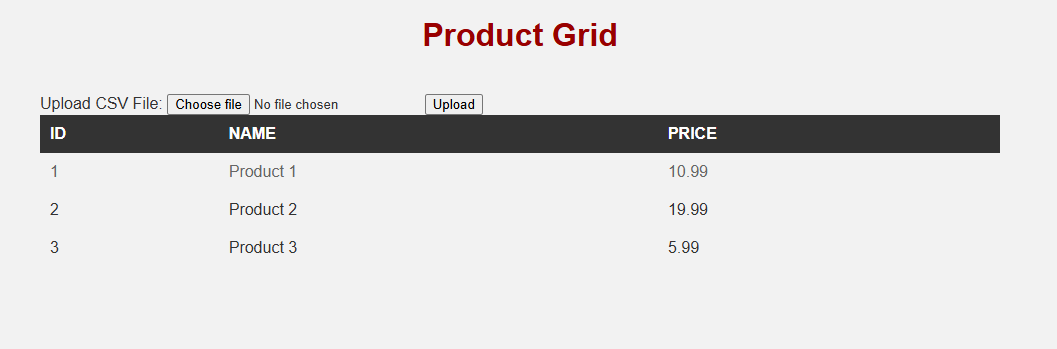
If you try to edit product 1 in the browser, nothing happens. The cell won’t take a cursor and the row’s greyed out, while product 2 and 3 edit fine. There is an example CSV file download, so lets upload that and have a look at the request.
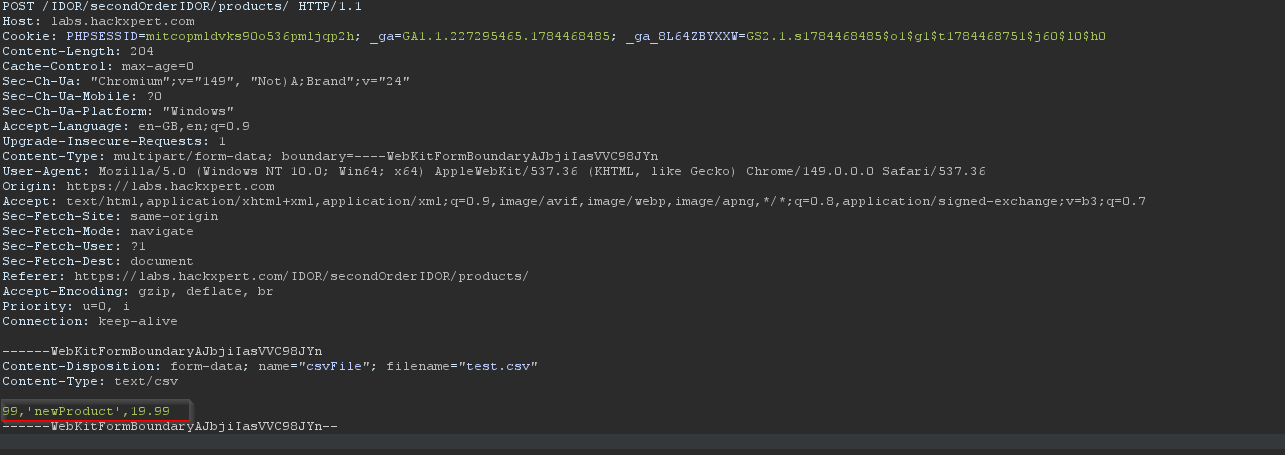
So the example CSV data is 99,'newProduct',19.99. Uploading it sends a multipart form POST to the products page with the file attached.
It seems that because product ID 99 didn’t exist, so the import has added it as a new row in the grid.
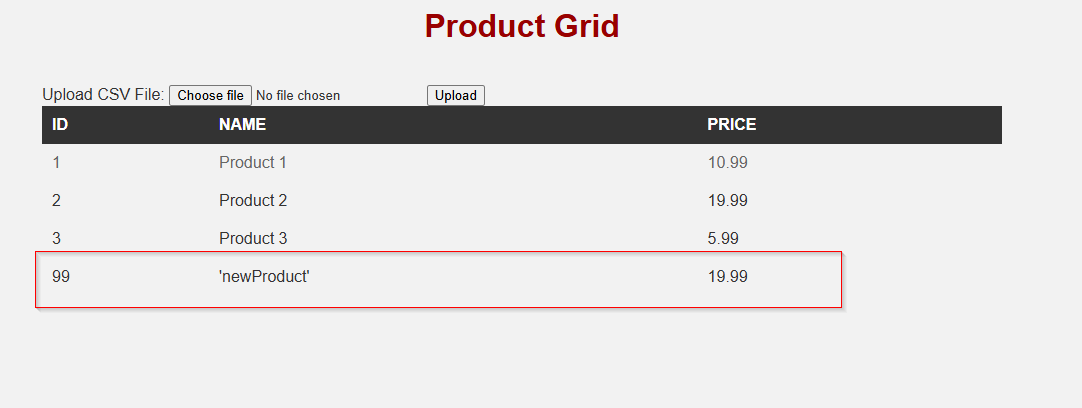
The red flag this raises is there’s clearly no check on whether you’re allowed to set the ID you send, it just accepted 99 and added it as a new row. So what happens if we change that 99 to 1?
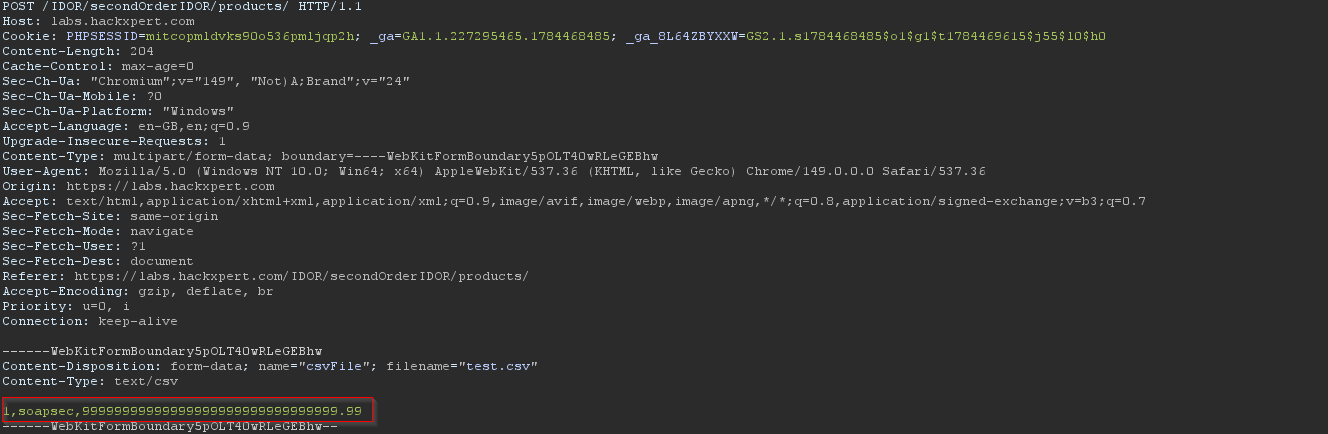
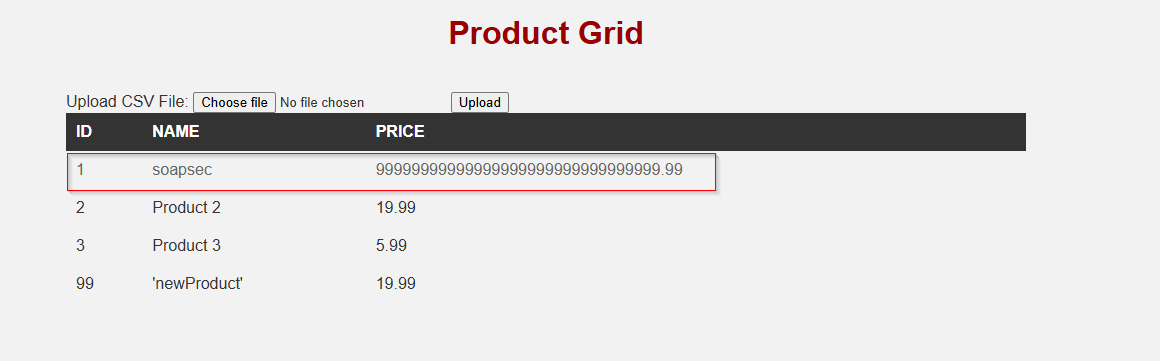
Nice! We have changed product 1, and put a stupidly long number in the price which it gladly accepted.
So that’s it from the black box side, lets have a look at the code.
The front end blocks making changes to product 1 in a few places. The first is this:
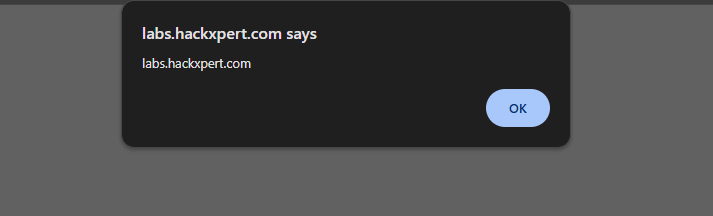
This puts contenteditable="false" on product 1’s cells and true on the rest, and sticks a read-only class on product 1’s row. So the server works out one time when it renders the page which rows you can edit, then hands that off to the browser to enforce. A little side quest also, <td><?php echo $product['productName']; ?></td> is echoing the value out with no encoding, so you can just set the name to something like <img src=x onerror=alert(document.domain)> and get stored XSS when the grid renders.
The CSS then greys the locked row so it looks disabled:
And app.js only attaches the save handler to the cells that are editable:
So product 1’s cells never get the listener that sends an edit, which is why clicking the row does nothing. Between the attribute, the greyed styling and the handler that skips the locked cells, that’s the whole “lock”, and all of it runs in the browser. None of it changes what the server does with a request on its own.
This is the server-side code that handles the upload:
It reads the id out of each line $productID = $line[0] and passes it to a lookup that finds a matching product:
If nothing matches, the id gets added as a new product, which is what happened with 99. If something matches, this line overwrites that product with the row from the file:
There’s no check for product 1 anywhere in here. The import looks the id up, but only to decide whether to add or overwrite, it never checks whether you’re allowed to write that id. So when I put 1 in the file, the lookup found the real product 1 and the record got replaced. The grid lock never comes into it, because the grid isn’t involved once you’re uploading a file.
One thing to note, the id comes out of the file as a string and the stored id is an integer, but the comparison in the lookup is loose (==), so “1” == 1 is true and the match still lands. And because that line assigns the whole product array, the upload replaces every field of the record at once rather than a single column, so the name and price both get set from the file. Nothing validates either value, which is why the stupidly long price went straight in.
So the whole problem really is that the rule about product 1 was only in the browser. The server trusts whatever id it’s handed and writes it. The check needs to be where the write happens, in the upload handler, rejecting any row for product 1 instead of assuming the front end already stopped it.
Second-order IDOR - PatientPortal
For this next part I’ve gone and built my own app, a little patient portal in Python and Flask. This one’s a second-order IDOR. Instead of explaining the differences between normal IDOR and second-order IDOR in tediously long paragraphs I’m just going to walk you through it.
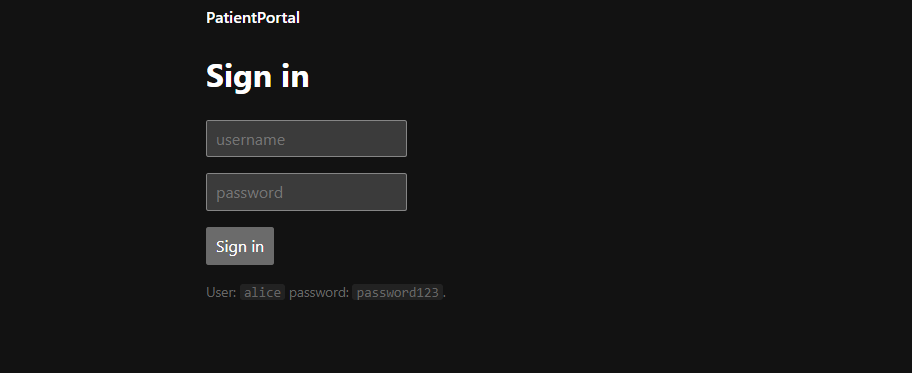
We log in with the credentials alice and password123.
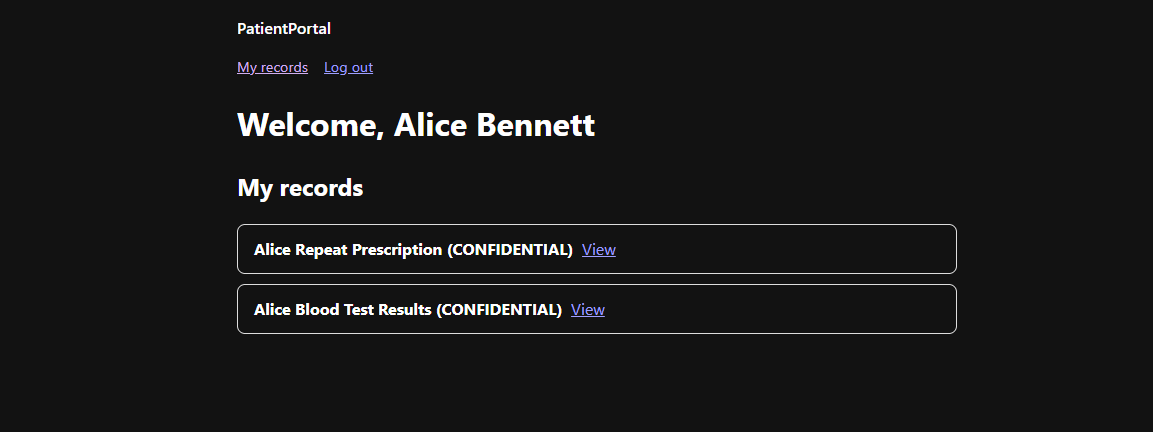
So, we are logged in as Alice Bennett, and under my records we have “repeat prescription” and “blood test results”. When we view “repeat prescription” in the browser we go to /record/view where we can see some notes about our repeat prescription. Nothing unusual.
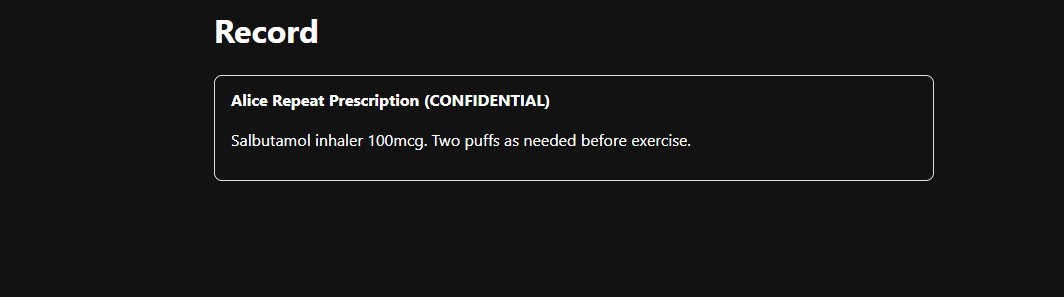
Going back to “My Records” and enabling burpsuite intercept, lets see what the request looks like when we click “View”:
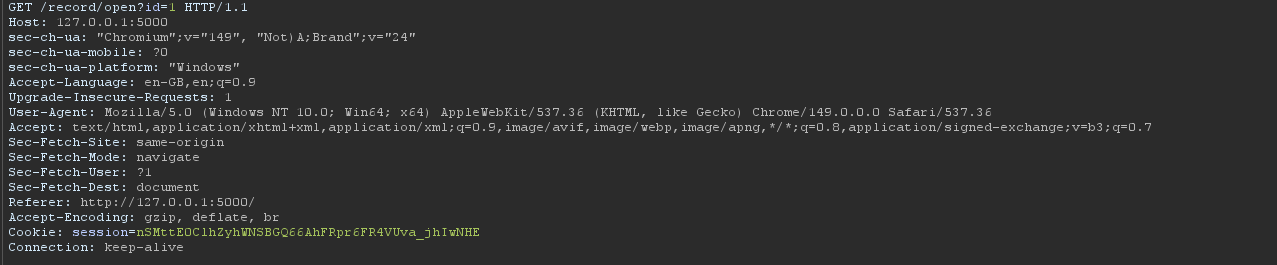
Aha! Instead of going to /record/view a request to /record/open?id=1 is made first. That id=1 is the kind of thing we look for on webapp tests, a direct object reference in the request. First thing worth trying is a textbook classic IDOR, lets send it to repeater and change the id to a record that isn’t ours and see if it gives it us.
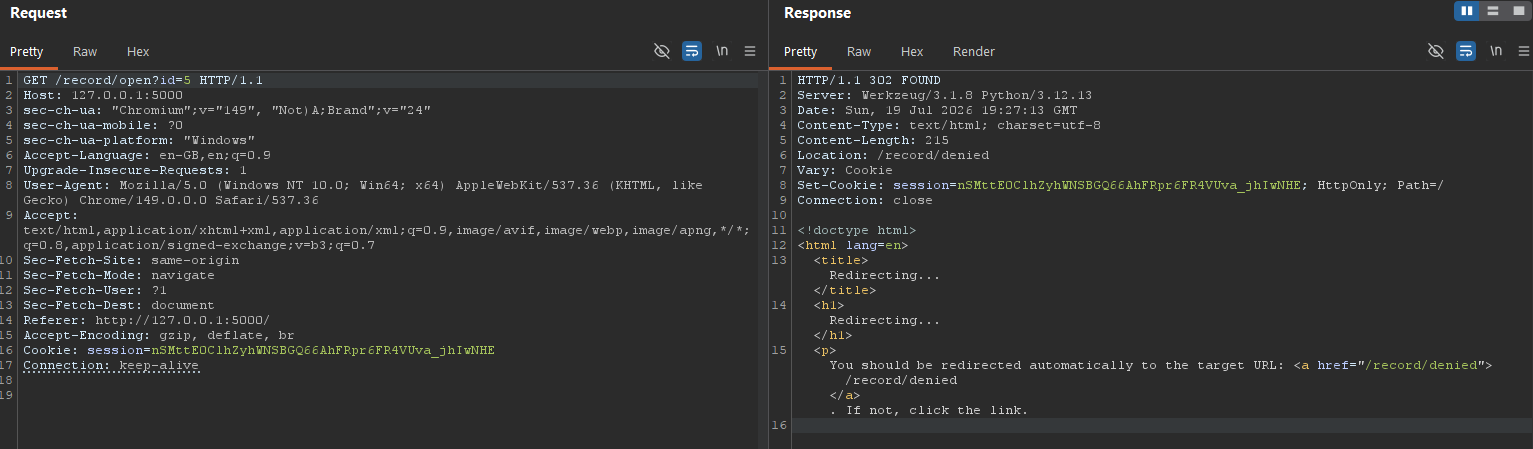
Changing it to id=5 gets us nowhere. The server sends back a 302 redirect straight to /record/denied which is a 403 page, the 403 page then tells us we’re not allowed that record, and nothing comes back with it.
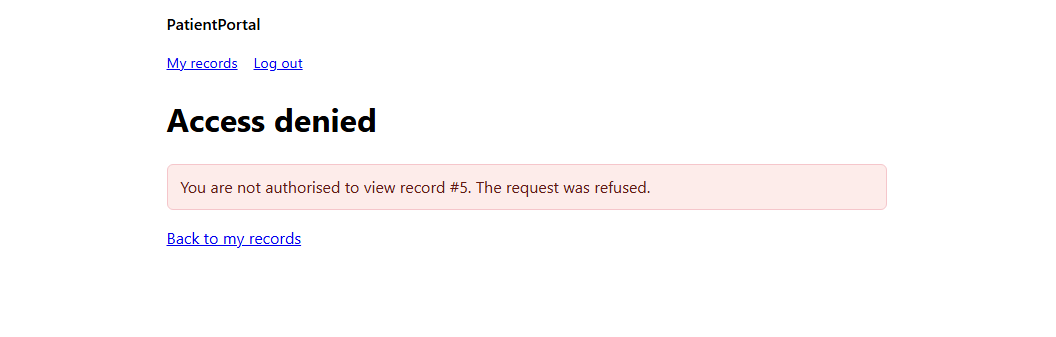
So /record/open must do a check on whether the record is ours before it shows it, this means that the textbook IDOR is a dead end. This is the point where a scanner, or AI with Autorize-style diff, would mark it enforced and move on, infact, this is something that would even make a lot of pentesters think it is a dead end. It redirects to a 403, the PatientPortal application is secure… or is it?
What happens if we simply ignore the 302 redirect?
Look again at those two requests. Clicking “View” didn’t just hit /record/view, it went to /record/open?id= first, and that redirected us on to /record/view or /record/denied depending on whether we are authorised to view the record. And /record/view doesn’t take an id at all, it just shows whatever /record/open lined up for it.
So /record/open denied us, but that was /record/open’s call. /record/viewis a separate request. Instead of letting it send us off to the /record/denied, lets see what happens when we directly go to /record/view after trying to access /record/open?id=5.
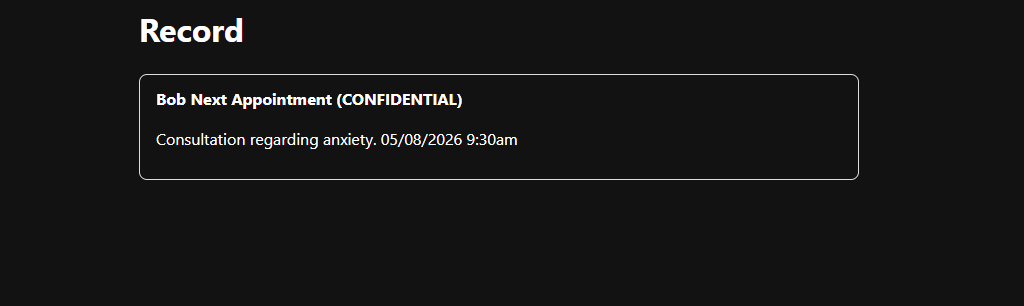
Hm, Bobs next appointment regarding his anxiety, wait, who the heck is Bob?! We’re logged in as Alice, but we’re looking at Bob’s confidential appointment note. /record/open denied us record 5 a moment ago, and here it is anyway!
This is what makes it a second-order IDOR rather than the classic one we tried first, the id we’re not allowed isn’t used on the request we send it on, it gets stored by the app and then trusted on a later request that never checks it again.
Now let’s look at the code and see why.
There are three routes involved, and the whole thing comes down to how they pass the record id between each other.
First, /record/open, the one we sent the id to:
There’s an ownership check in here, _owns, that just checks the record belongs to the user we’re logged in as:
If the record is ours we get redirected to /record/view, and if it isn’t we get sent to /record/denied. That’s the denied page we ran into earlier, and the check that decides it is correct.
The problem is this line above the check:
It saves our id into the session as an object reference, without checking whether we’re allowed that object. So by the time the check runs and decides to deny us, that reference is already saved.
Next is /record/view, the route that actually shows us a record:
This one reads that reference back out of the session and shows the record it points at. There’s no ownership check on it at all, it just shows whatever /record/open put there. So between the two, /record/open saves our object reference whether we’re allowed it or not, and /record/view shows whatever’s saved without checking. We ask for record 5, /record/open denies us but saves the reference to 5 anyway, then we hit /record/view and it reads 5 and shows it to us.
So why did we have to skip the denied page? Why couldn’t we just follow the redirect and then visit /record/view?
Here’s /record/denied:
It pops the reference back out of the session. When we followed the redirect earlier and landed on the denied page, that’s what cleared our stored reference, so if we’d gone to /record/view after seeing the denied page it would’ve had nothing to show. The reason the attack worked is we went straight to /record/view without loading the denied page in between, so the reference was still sitting in the session when view read it.
So now that we understand this vulnerability and that we can access other patients data, as an attacker we don’t want to stop at Bob’s data, we want to extract all of the patient data from the portal. Doing it by hand one record at a time would be very slow, there could be hundreds of patient records in the application. Since the vulnerability is the same every time, we can write some code to automate the extraction, /record/open?id=N to load the reference into the session, then /record/view to read it back, for every id in turn, and scrape the record out of the response.
The one thing we have to get right is the bit we just found in the application code. We can’t follow redirects, because following the redirect on a denied record lands us on /record/denied which pops the reference straight back out and leaves /record/view empty. So the script logs in once, then for each id sends the open request without following the redirect, sends the view request, and pulls the record title and body out of the page.
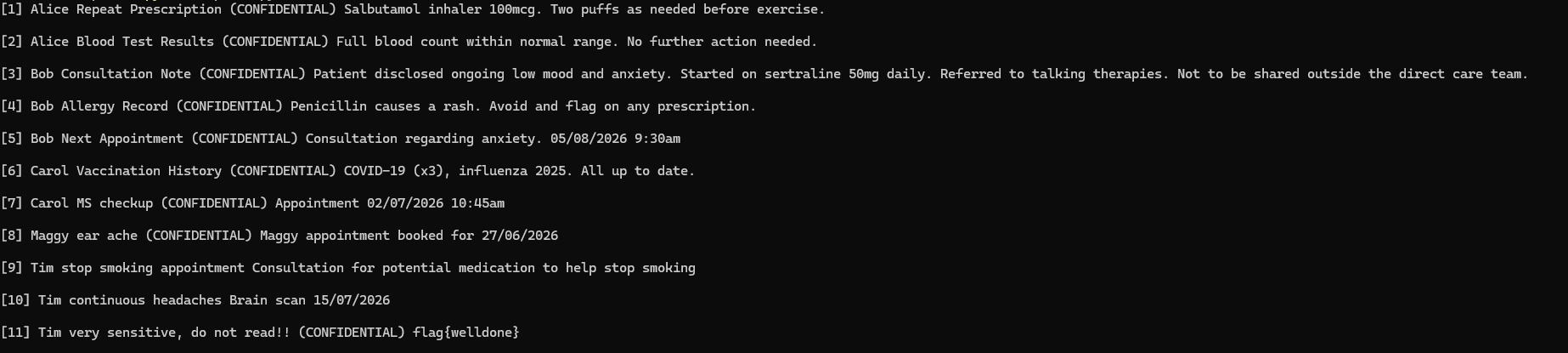
Nice, we wrote an exploit and pulled every patient record out of the portal, and on record 11 there’s a little flag. :D
This is the whole point of it. On the surface the app looked fine, it logged us in, showed us our own records, and blocked us when we went for one that wasn’t ours. But the check was on the wrong request. /record/open decided whether to let us in, and /record/view was the one actually handing over the data, and it never checked anything. That’s what makes second-order IDOR worth knowing, the bug isn’t on the typical IDOR request you’d go after first, it’s often behind a control that looks like it’s working but is very broken.
I’m putting PatientPortal on my GitHub on the 1st August 2026 so you can have a go yourself! What we’ve covered here is a simple vulnerable version to get you started on abit more tricky IDOR, but there’ll be a another challenge or two in there too, some harder takes on the same idea to see if you can find where the check goes missing. Have a crack at it, go and look at the code and see what went wrong, then develop an exploit for it to extract the flag.
Wrapping up
So that’s a couple of real cases of broken access control, and hopefully some idea of why it’s still sat at number one on the OWASP list.
The reason its A01 is there’s no single fix for it. With something like SQL injection you use parameterised queries and you’re basically done. Access control isn’t like that. Every endpoint and every action needs its own check on whether the user’s actually allowed it, and that’s a decision someone has to get right every single time and a tester has to notice if they don’t. It only takes one to get missed and it won’t always be obvious. None of this is hard to understand, the problem isn’t vulnerability / exploitation complexity it’s that it’s very easy to miss one, and they are often somewhere you’re not looking.